Preview
The center preview shows the composition at the playhead. Preview and export use the same compositor, so framing, effects, and overlays match the final file.
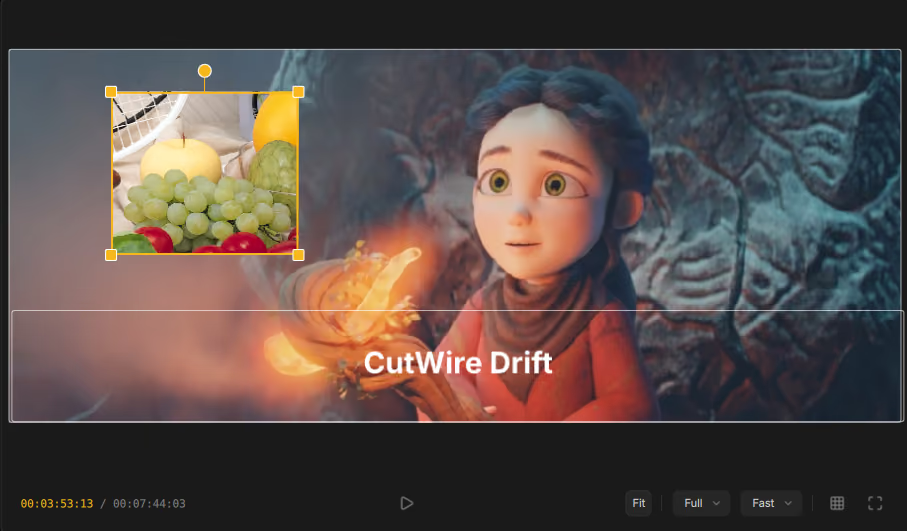
Playback and playhead
- Press Space to play or pause (same as the timeline).
- Drag the playhead on the timeline (or scrub) to seek.
- The time readout on the timeline shows
current / total.
Fit and Fill
| Mode | Behavior |
|---|---|
| Fit | Letterbox the frame so the whole picture is visible. |
| Fill | Scale to fill the viewer (edges may clip in the viewer only — not in export). |
Preview quality
Lower the preview resolution for smoother scrubbing on heavy timelines:
| Option | Use when |
|---|---|
| Full | Accurate pixel check. |
| Half / Quarter | Faster interaction on complex projects. |
A separate Fast / Quality playback preference trades responsiveness for preview fidelity while editing. Export always uses full quality.
Guides
Toggle composition helpers (G or the guides control):
| Guide | Purpose |
|---|---|
| Rule of thirds | Classic framing grid. |
| Center cross | Exact center. |
| Safe margins | Keep titles and faces inside safe areas. |
Enable or disable guides globally under Settings.
Fullscreen
Expand the preview for a closer look. Exit fullscreen with the same control or
Escape (also clears selection when not in a special overlay).
Transform and crop overlays
When you edit Position & size on a clip, handles appear on the preview for drag-to-move and resize.
When you Crop video size from Settings, the crop overlay shows:
- Drag the edges to reframe
- Ctrl + scroll to zoom
- Middle-drag to pan
- Fit view · Reset · Apply
Cancel with Cancel crop in Settings if you change your mind.