Media library
The left Assets panel is where you import files and browse built-in content. Switch tabs along the side; most tabs let you drag items onto the timeline.
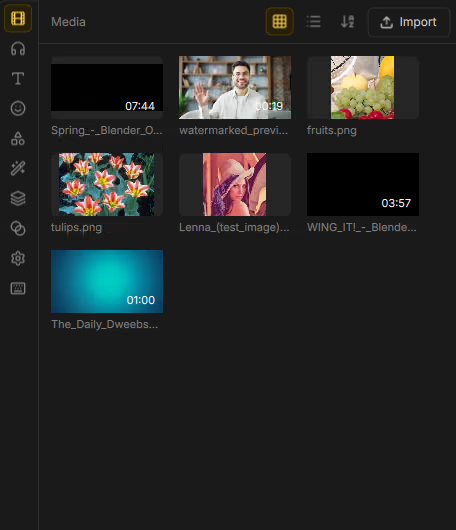
Media
Imported video, image, and audio files.
| Control | What it does |
|---|---|
| Import | Pick files from disk. |
| Grid / List | Toggle thumbnail grid or list view. |
| Sort by name / Sort by type | Order the library. |
Drag files onto the Media tab to import. While dragging you’ll see Drop to import — Video, audio and image files. Large imports show Importing….
Supported extensions include: .mp4, .mov, .mkv, .avi, .webm, .m4v,
.mp3, .wav, .aac, .flac, .ogg, .m4a, .png, .jpg, .jpeg, .gif,
.webp, .bmp.
Sounds
Audio-effect presets (EQ, voice FX, space, texture, and more). Drag onto an audio or video clip, or apply from the clip’s Audio properties. See Audio.
Text
Create titles and captions:
- Add a text clip (blank or with typed content).
- Add subtitle clip for a subtitle lane clip.
- Import subtitle file (
.srt). - Add auto caption — speech-to-text (needs the Whisper / AI addons).
Details: Text and titles and Captions.
Stickers
Emoji and sticker packs by category. If packs aren’t installed yet, Drift points you to Extras. Use More emoji for the full picker. See Stickers and shapes.
Shapes
Built-in vector shapes in categories:
| Category | Examples |
|---|---|
| Basic | Rectangle, Ellipse, Triangle, Diamond, Hexagon, … |
| Arrows | Arrow, Double arrow, Chevron, … |
| Bubbles | Speech bubble, Thought bubble, Callout |
| Fun | Star, Heart, Burst, Cloud, Lightning bolt, … |
Click or drag onto the timeline; restyle in the Shape properties tab.
Effects
GPU video effects grouped by category (Glitch, Retro, Dreamy, Impact, Funny Face, Artistic, Keying, and more). Drag onto a visual clip or browse from Properties → Effects. Catalog and workflow: Effects.
Templates
Music-synced look templates (Anime Punch, Beat Drop, Cinematic Open, and more). Some need a cutout or music on the timeline. See Templates.
Transitions
Transition cards. Tip in the UI: Drag onto where two clips overlap… Full list and inspector: Transitions.
Settings
Project video size, layout chooser, crop canvas, preview guides/background, and update checks — documented on Settings.
Shortcuts
Browse and rebind keyboard shortcuts — Hotkeys.