The interface
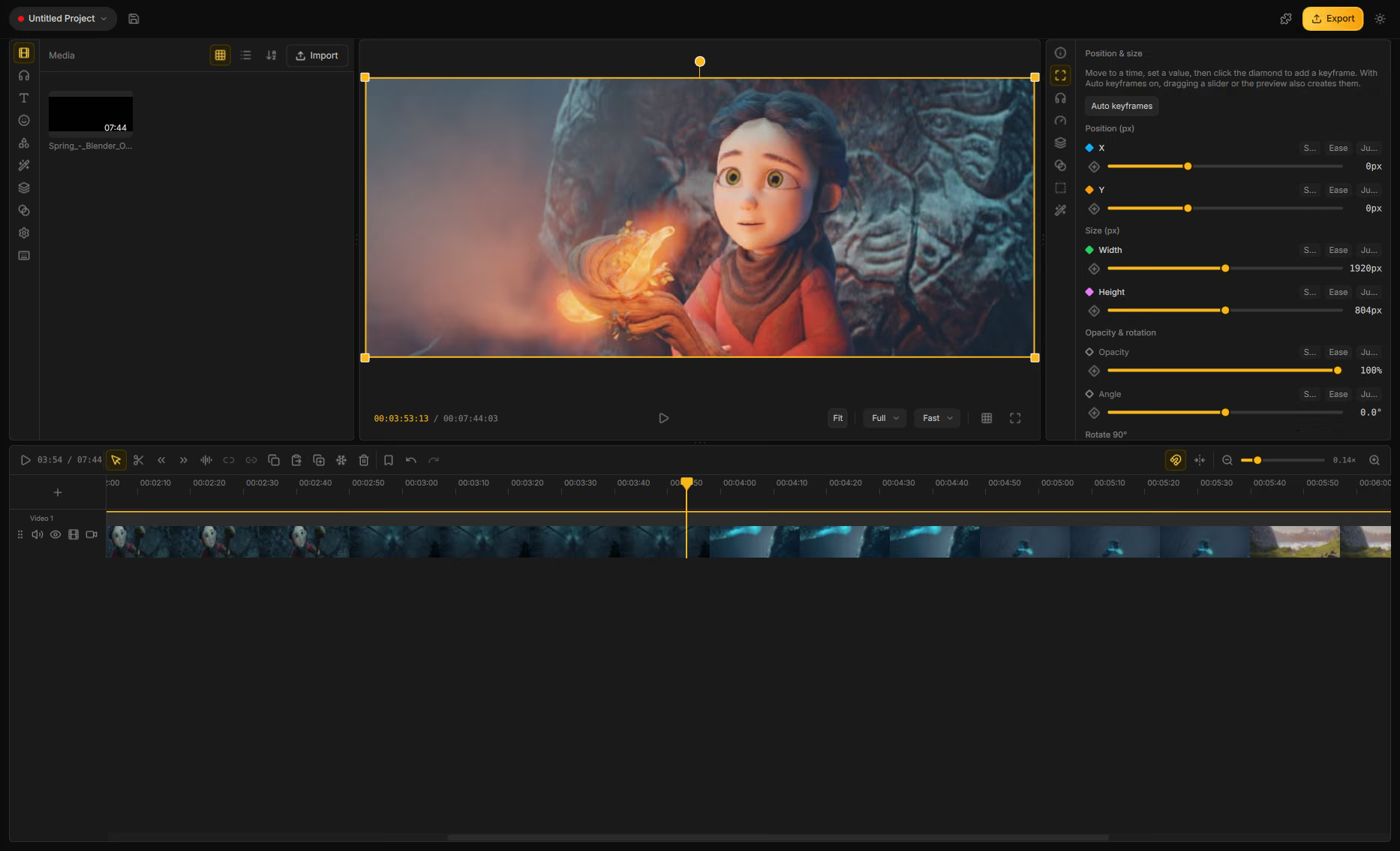
Drift’s main window is one workspace: assets on the left, preview in the center, properties on the right, and the timeline along the bottom.
Header
The top bar holds project and export controls:
| Control | What it does |
|---|---|
| Project pill | Shows the project name and saved/unsaved state. Click to open recent projects, Initialize new project, Open project…, Save with media…, and Project properties…. |
| Save | Saves the current project (Ctrl+S). |
| Extras | Opens the Addon Manager. |
| Update badge | Appears when a newer Drift version is available. |
| Export | Opens the export dialog. |
| Theme | Switch between light and dark mode. |
Assets panel (left)
Tabs for browsing and adding content. Each tab is covered on Media library:
Media · Sounds · Text · Stickers · Shapes · Effects · Templates · Transitions · Settings · Shortcuts
Drag items from most tabs onto the timeline (or onto overlapping clips for transitions). The Settings and Shortcuts tabs configure the project and keyboard map instead of adding clips.
Preview (center)
The composition at the current playhead. Toolbar controls include:
| Control | What it does |
|---|---|
| Fit / Fill | Scale the frame inside the viewer. |
| Quality | Full, Half, or Quarter resolution for smoother scrubbing. |
| Playback mode | Prefer fast preview or higher quality. |
| Guides | Rule of thirds, center cross, safe margins (G toggles). |
| Fullscreen | Expand the preview. |
Overlay modes for transform and crop appear when you edit position or crop the canvas. Details: Preview.
Properties panel (right)
Shows controls for the selected clip. If nothing is selected you’ll see “It's empty here” — click a clip on the timeline to edit it.
Tabs appear based on clip type — General, Text, Position & size, Audio, Speed & Fade, Layer mix, Transition, Cutouts, Effects, Subtitles, Shape, and more. Overview: Editing clips.
Timeline (bottom)
Multi-track editor with a toolbar for play/pause, select/cut/trim tools, split helpers, copy/paste, freeze frame, bookmarks, snap, ripple, and zoom.
Track types include video, audio, text, subtitle, and shape. Each track can be muted or hidden. Full reference: Timeline.