Hotkeys
Drift ships with a default shortcut map. Browse and rebind keys in Assets → Shortcuts.
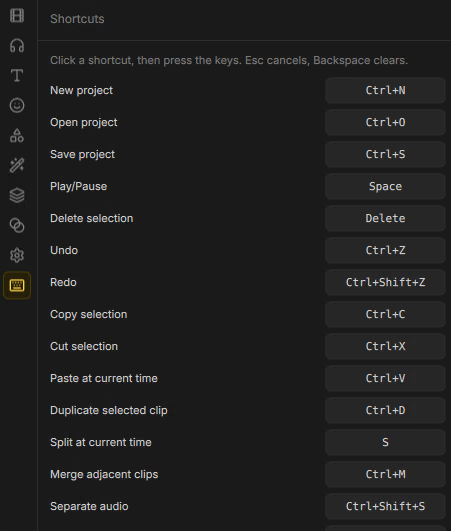
Default shortcuts
| Shortcut | Action |
|---|---|
Ctrl+N | New project |
Ctrl+O | Open project |
Ctrl+S | Save project |
Space | Play / Pause |
Delete | Delete selection |
Ctrl+Z | Undo |
Ctrl+Shift+Z | Redo |
Escape | Clear selection |
Ctrl+A | Select all clips |
Ctrl+D | Duplicate selected clip |
S | Split at current time |
Ctrl+M | Merge adjacent clips |
Ctrl+Shift+U | Unlink audio |
Ctrl+Shift+S | Separate audio |
Ctrl+C | Copy selection |
Ctrl+X | Cut selection |
Ctrl+V | Paste at current time |
Alt+Left | Move selection left a little |
Alt+Right | Move selection right a little |
G | Toggle guides |
Timeline tool keys
These live on the timeline toolbar (not always listed as rebindable app actions):
| Key | Tool |
|---|---|
V | Select — normal editing |
B | Cut mode — click a clip to split it |
Customize
Open Assets → Shortcuts, select an action, and capture a new key combination. Conflicts are shown in the list so you can resolve them. Bindings persist with your Drift preferences across projects.