Export
Click Export in the header to save the timeline as a video file. Drift exports what you see in the preview — same compositor, same framing.
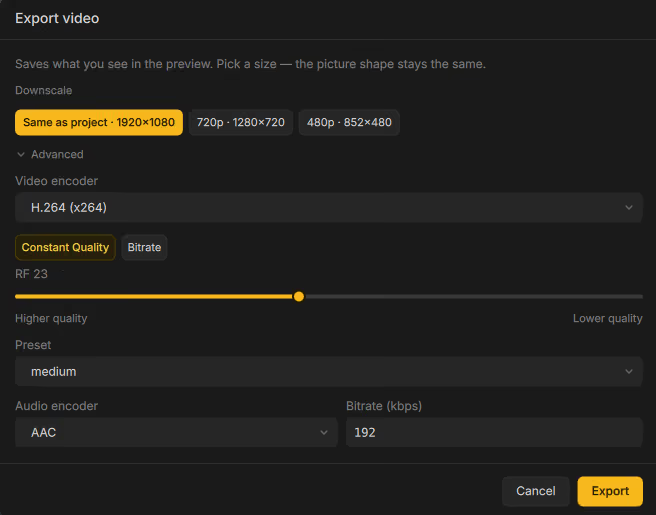
Size
The dialog blurb: “Saves what you see in the preview. Pick a size — the picture shape stays the same.”
Downscale chips offer the project size plus smaller presets that won’t upscale, for example:
| Chip | Typical use |
|---|---|
| Same as project · W×H | Full project resolution |
| 1080p / 720p / 480p | Smaller delivery files |
Default video bitrates (when using bitrate mode) scale with the chosen size (source ≈ 16000 kbps, 1080p ≈ 12000, 720p ≈ 8000, 480p ≈ 4000).
Advanced
Expand Advanced for encoder control.
Video encoder
Available encoders depend on your build. Common options include:
H.264 (x264) · H.264 10-bit · H.265 (x265) · H.265 10/12-bit · AV1 (SVT) · AV1 10-bit · VP8 · VP9 · VP9 10-bit · ProRes · DNxHR · FFV1 · MPEG-4 · MPEG-2 · Theora
Rate control
| Mode | Behavior |
|---|---|
| Constant Quality | Slider RF N (0–51). Lower = higher quality. |
| Bitrate (kbps) | Target average bitrate. |
Typical defaults: H.264 CRF 23 preset medium; H.265 CRF 28; AV1 CRF
35 preset 6; VP9 CRF 32.
Preset ranges depend on the encoder (x264/x265: ultrafast…veryslow;
SVT AV1: 0–12; VP8/VP9 cpu-used: 0–8).
Audio encoder
AAC · Opus · MP3 · AC3 · FLAC
Default audio bitrate is 192 kbps (hidden for lossless FLAC).
Save and progress
Choose a container that fits the codec pair (MP4, Matroska, or WebM). Click Export to start. Status toasts include Export started… and Export cancelled.
If an export is already running, Drift reports Export already in progress.