Transitions
Transitions blend from one clip into the next where they overlap on the same track.
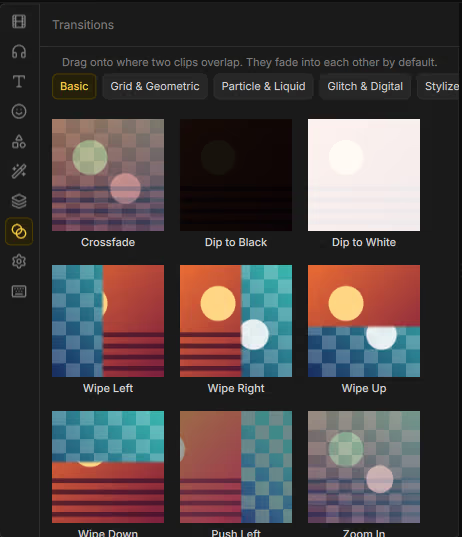
Drag a transition onto where two clips overlap:

Place a transition
- Overlap two clips on a video track (or leave a join you can bridge).
- Open Assets → Transitions.
- Drag a transition onto the overlap — the UI tip: Drag onto where two clips overlap…
You can also select the join and use Properties → Transition → Add crossfade (0.5 s) for a quick default.
Transition inspector
| Control | What it does |
|---|---|
| Type | Which transition style to use. |
| Duration (s) | How long the blend lasts. |
| Parameters | Style-specific knobs when available. |
| Remove transition | Clear the transition from the join. |
Bundled transitions
| Category | Transitions |
|---|---|
| Basic | Crossfade, Dip to Black, Dip to White, Push Left, Wipe Down, Wipe Left, Wipe Right, Wipe Up, Zoom In |
| Stylized & Cinematic | Cross-Zoom Swirl, Kaleidoscope Spin, Lens Flare Wipe, Luma Fade, Radial Zoom Blur |
| Grid & Geometric | Honeycomb Hexagon, Linear Blinds, Pixelate Matrix, Triangle Mosaic, Voronoi Shatter |
| Glitch & Digital | Analog Interference, Digital Matrix Rain, RGB Displacement, VHS Scanline |
| Particle & Liquid | Bubbling Dissolve, Ink Bleed, Liquid Smudge, Particle Wind, Plasma Burn |