Drift
Create polished videos fast — free, open, and yours.
Drift is a free, open-source desktop video editor from CutWire Studios. Drop in clips, add effects and stickers, generate captions, and export — with no subscription, no watermark, and no account required.
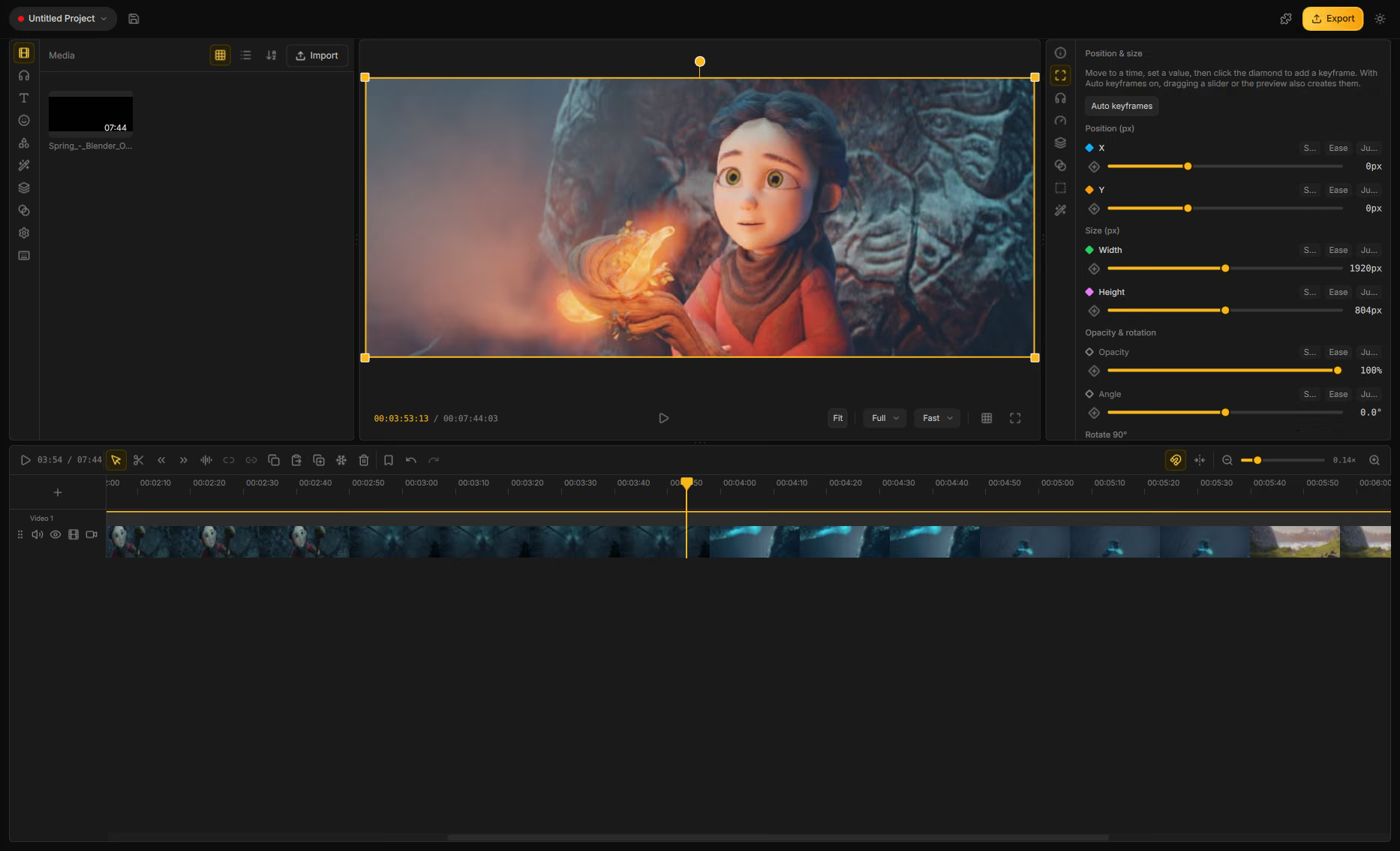
Preview and export share one compositor, so what you see is what you get.
What you can do with it
- Multi-track timeline — trim, split, snap, ripple, mute/hide tracks, and full undo/redo.
- Effects & transitions — GPU effects, stylish transitions, and reusable look templates.
- Stickers, titles & shapes — finish the look without leaving the editor.
- Auto captions — speech-to-text captions you can edit on the timeline.
- Cutouts & masks — isolate subjects, mask clips, and key out green screens.
- Speed & motion — speed changes, reverse, fades, and animate to the beat.
- Audio tools — mixing, effect chain, and background noise cleanup.
- Addons — optional fonts, stickers, speech models, and acceleration runtimes.
- Project bundles — package a project with its media for sharing and backup.
- Export — choose size and codec so the file matches what you saw in preview.
How the pieces fit together
| Concept | What it is |
|---|---|
| Assets panel | Left sidebar for Media, Sounds, Text, Stickers, Shapes, Effects, Templates, Transitions, Settings, and Shortcuts. |
| Preview | Center viewer for the composition at the playhead — Fit/Fill, quality, guides, fullscreen. |
| Properties | Right panel for the selected clip — timing, transform, effects, audio, and more. |
| Timeline | Bottom multi-track editor — video, audio, text, subtitle, and shape lanes. |
| Extras | Addon Manager in the header — install fonts, stickers, AI models, and runtimes. |
Start here
- Getting started — import clips, edit on the timeline, and export.
- The interface — every pane and control explained.
- Projects — new, open, save, and shareable
.driftpackages. - Media library — import and browse assets.
- Timeline — tracks, tools, and clip operations.
- Clip tools — text, effects, captions, keyframes, and more.
- Addons — fonts, stickers, and AI features (captions, cutouts, faces, denoise).
- Hotkeys — defaults and how to customize them.
Looking for a download? Grab a build from the Drift releases page on GitHub.